Tuesday, 31 January 2012

Windows 8 Beta Running in Computer Repairs Center, Perth, Scotland

Installed on a test system for first look.

Boot time is very impressive:


There are updates already!!!


Have to stress that this is a BETA copy of Windows 8

Metro Interface


Windows 8 feels fastish based on the hardware that we are using for the Beta version. However you must remember that the system does not have any extra software or drivers installed.

The system has very clearly been designed for touch screen and tablets.

We were very surprised but the fact that there is no option to shutdown or reboot from the interface. The only way we found was the physical power button.

Windows 8 did offer to reboot in 2 days time once it had installed the updates !!


Here is just a quick video of Alex playing with the interface, be kind, this is his first try at it and he gets a little lost sometimes (Apologies for the background noise, this was shot in the workshop):


Funky looking weather app:

Underneath the eye candy, the core is very very Windows 7 like as can been seen from these screen shots:


No real comment at this stage as we need to spend some time with it but at this time, it has not really rung our bell BUT we'll see how we get on once we have a decent play with it.

We have now updated onto the Windows 8 Consumer Preview Edition. We have a system running the latest version of Windows 8 in our computer and laptop repair workshop

A laptop running Windows 8 Consumer Preview is available in our laptop sales area for anybody who wishes to have a look at the new Windows 8 interface


Monday, 30 January 2012

Liquid Spills on Laptops

3 machines brought in today suffering from spills onto the keyboard :(

One wine, one coffee and one milk.

Prompted us to write this article http://www.pcsolutions.co.uk/news/how-to-recover-your-laptop-from-a-coffee-or-liquid-spill.html

In the event that any liquid gets spilt on your laptop or computer, DO NOT SWITCH IT ON but bring it into our computer and laptop repairs facility where we can assess the damage at no charge.

Friday, 27 January 2012

How to Install iTunes: a Step by Step guide

This is a guide to show you step by step how to install iTunes.

Step 1: Download the software from the iTunes site. http://www.apple.com/itunes/download/  <- Click here to go straight to the Apple page where the software is kept. Figure 1 should what the page should look like, click the "Download Now" button that I have highlighted in figure 1

figure 1
Step 2: When you have clicked the "Download Now" button it should prompt you asking if you want to "Run" or "Save" the program. Click on the "Run" button.

Step 3: When iTunes has fully downloaded the first window to appear should be this:

figure 2
Step 4: This is the first of the installation screen, click the "Next" button to continue the installation.

figure 3
This next screen is asking where to install the program, you do not need to change anything here. Hit "Install" to continue, when you click continue it another window will pop up. It effectively is asking "Do you really want to do this" Just click "Yes" to continue.

Step 5: This is the next window that will appear.

figure 4
This window will work away installing your iTunes, it might do it for a couple of minutes. After its done it will pop up with another "Do you really want to do this" Just click yes to continue.

Step 6: This screen will appear when it has finished with the last loading screen.

figure 5
This is the iTunes just finishing, so its not long now until its finished installing. Click "Finish" to continue.

Step 7: The next screen to appear is the Licence agreement screen.
figure 6
 It just tells you what you can and cannot do with iTunes. Apple recommends you read this but its not important. Click "Agree" to continue.

Well done you have not installed iTunes.

figure 7
If you have any problems get in contact with us.You will find all our details here: http://www.pcsolutions.co.uk/contact-us.php

Cheers

Laptop Keyboard Destroyed by 20 Month Baby

This is why very young children and laptops DO NOT mix well:
Laptop Keyboard Destroyed by Baby

Luckily the lad did not swallow any of the parts!

The client brought this laptop into our computer and laptop repair center in Perth on a Monday and collected the laptop after the repair on the Thursday of the same week

Todays challenge 27/1/2012

Today one of our challenges is to find the reason why this desktop us overheating. Its going to be a budget gaming system with a dual core processor and dual graphics.


Wednesday, 25 January 2012

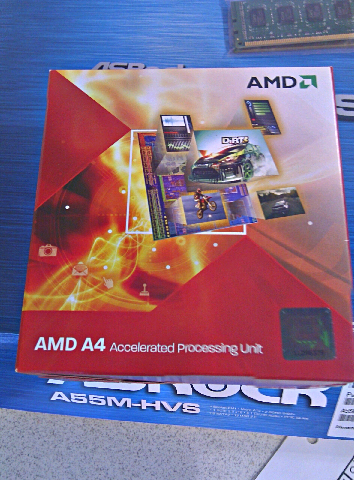
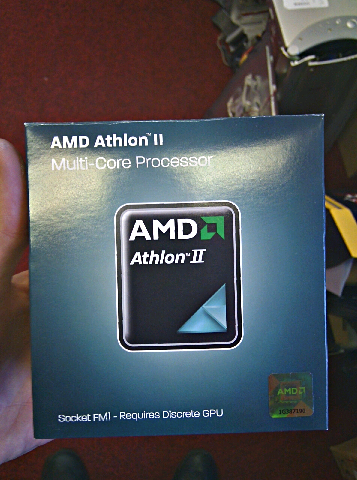
New AMD box

Got one of AMD's new fm1 processors in. Just noticed the new colourful box.

New Design


Old Box


Agreed this is a APU box compared to a Athlon box yet very different.

Watch this space for a comparison between the old and new chips from AMD.

Tuesday, 24 January 2012

Successful Haggis Hunt In Perth

As it's Burns Night on the 25th of Jan, where we celebrate the life and works of Robbie Burns, Alex our Special Tech Engineer tried his hand at Haggis Hunting this morning.

Haggis are wily creatures and are very good at hiding in the heather and bracken. Being small and fleet of hoof, Haggis love to roam on the craggy hills of Scotland making them very difficult to see, never mind catch.

Alex has youth on his side and I'm pleased to report that he managed to catch a brace of Haggis in Glenfarg, a well know haggis haunt.
A Brace Of Haggis, Plucked & Prepped 

Here's Alex to tell you how he caught the haggis: