Showing posts with label pc solutions. Show all posts

Monday, 17 December 2012

Day Six of Christmas Give-Away Competition

Day Six of our Christmas Give-Away Competition


To win one of 7, Bullguard Internet Security 13 Packages, all you have to do is LIKE our Facebook page and then share today's picture.


Friday, 27 January 2012

How to Install iTunes: a Step by Step guide

This is a guide to show you step by step how to install iTunes.

Step 1: Download the software from the iTunes site. http://www.apple.com/itunes/download/  <- Click here to go straight to the Apple page where the software is kept. Figure 1 should what the page should look like, click the "Download Now" button that I have highlighted in figure 1

figure 1
Step 2: When you have clicked the "Download Now" button it should prompt you asking if you want to "Run" or "Save" the program. Click on the "Run" button.

Step 3: When iTunes has fully downloaded the first window to appear should be this:
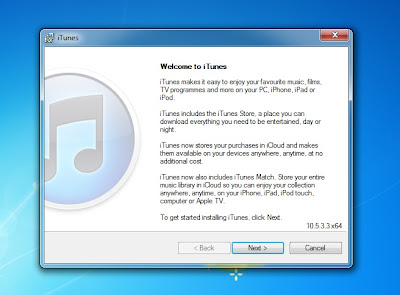
figure 2
Step 4: This is the first of the installation screen, click the "Next" button to continue the installation.
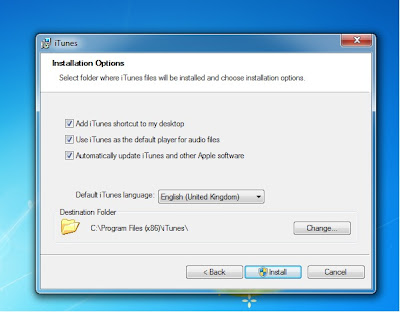
figure 3
This next screen is asking where to install the program, you do not need to change anything here. Hit "Install" to continue, when you click continue it another window will pop up. It effectively is asking "Do you really want to do this" Just click "Yes" to continue.

Step 5: This is the next window that will appear.
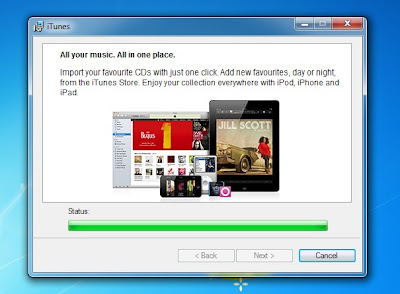
figure 4
This window will work away installing your iTunes, it might do it for a couple of minutes. After its done it will pop up with another "Do you really want to do this" Just click yes to continue.

Step 6: This screen will appear when it has finished with the last loading screen.
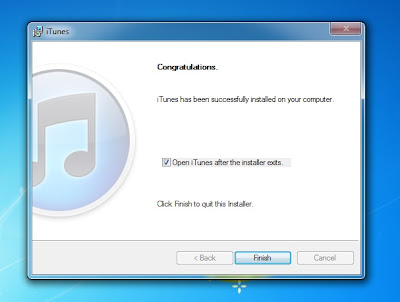
figure 5
This is the iTunes just finishing, so its not long now until its finished installing. Click "Finish" to continue.

Step 7: The next screen to appear is the Licence agreement screen.
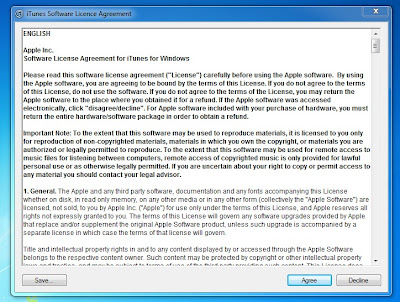
figure 6
 It just tells you what you can and cannot do with iTunes. Apple recommends you read this but its not important. Click "Agree" to continue.

Well done you have not installed iTunes.

figure 7
If you have any problems get in contact with us.You will find all our details here: http://www.pcsolutions.co.uk/contact-us.php

Cheers

Todays challenge 27/1/2012

Today one of our challenges is to find the reason why this desktop us overheating. Its going to be a budget gaming system with a dual core processor and dual graphics.


Wednesday, 25 January 2012

New AMD box

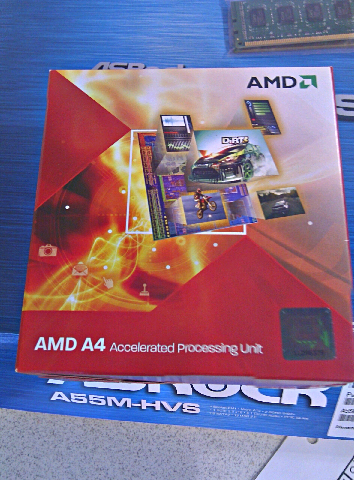
Got one of AMD's new fm1 processors in. Just noticed the new colourful box.

New Design


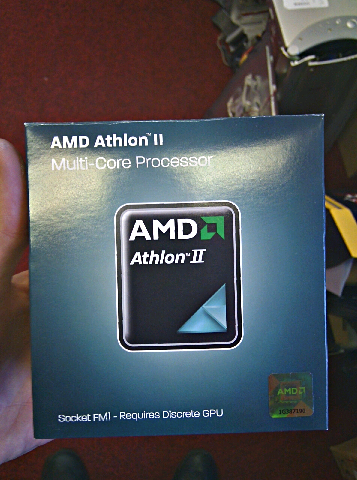
Old Box


Agreed this is a APU box compared to a Athlon box yet very different.

Watch this space for a comparison between the old and new chips from AMD.

Tuesday, 24 January 2012

Media firefly

This system would make an ideal media system. Small form factor 320 gb of storage, dual core Pentium and 2 gb memory and windows 7.


English troubles

Looks like this laptop might have some trouble with its English.

Thursday, 19 January 2012

Computer Gaming Pedigree

Alex, our Engineer, shares his enthusiasm for custom building gaming rigs by sharing his own personal gaming system.

As one of the main gaming enthusiasts in the workshop I take great pride and pleasure in creating gaming specifications to a wide variety of budgets and gaming needs. I also enjoy physically building the computers and testing them.

So I thought I would share with you all my own gaming system that I have built up over the years to illustrate that I am very passionate about what I do and take pride in every system I build, big or small.

System Specs

Processor:- AMD Phenom II x6 1090t Black Edition.
Memory:- Corsair 16GB 1600Mhz.
Graphics:- 2x AMD HD 5870 (In Crossfire).
Motherboard:- Asus Crosshair V Republic of Gamers.
Hard Drive 1:- 240GB Patriot Pyro 6Gbit Sata SSD.
Hard Drive 2:- 2TB Hard Drive.
Power Supply:- Thermaltake 650Watt Modular. 
Cooling:- Phobia 280mm Radiator, XSPC Reservoir and pump combo and XSPC waterblock.
Case:- Antec Dark Fleet 85 (3x120mm fans on the front, 120mm fan rear mounted and 2x140mm fans mounted on radiator.).


If you have any questions don't hesitate to give us a call or pop onto the website http://www.pcsolutions.co.uk

Friday, 13 January 2012

Antec 300 Case Review

This is a quick review of the Ante 300 case.
This is a nice non flamboyant case that has the gamer in mind. I personally am a fan of this case, I used to have one, because of the sleek look of the case and the good cooling capacity. 

The 300 is made from heavy duty perforated steel panels which gives the case a sturdy build, yet not the lightest. It has three 5.25" bays for CD/DVD drives and it has six 3.5" bays for hard drives and a bottom mounted 2.5" mount for your SSD. 

The case has two front fans, one top mounted fan and one rear mounted fan. Thus giving the case sufficient cooling for gaming components.
The inside of the case is not finished with the black like its younger sibling the Antec 100 yet it has the same cable management solutions that you would find in the Antec 100. It has the cut out so that the motherboard processor mount can be changed easily. It also has the bottom mounted PSU helping in the cable management.
Overall the Antec 300 case is a very good case for gaming and high end use. I would say it is not suitable for water-cooling or dual graphics card set up as it does not have enough room and cooling for this. It would have been nice to see the black interior like the Antec 100 but that is just personal opinion. I would also have been nice to have dual 120mm fan mounts on the roof and back but this is approaching on its main gaming cases the Dark Fleet series.
For a few more specs on this case visit the Antec site (Antec 300 Case
Images where used from the antec site.